LaCie FM Radio NDA
Listen to your favorite FM stations from your Apple IIgs computer! The FM Radio ADB device shipped in 1996 for the Macintosh. We wrote a New Desk Accessory to drive the FM Radio directly from your Apple IIgs.
FM Radio hardware setup
- Shut down and power off the Apple IIgs before connecting the FM Radio.
Important: ignoring this warning may result in severe damage to both the ADB port and the Apple IIgs motherboard. - Disconnect the keyboard cable from the back of the Apple IIgs (it is attached to the ADB port).
- Connect the FM Radio ADB cable to the ADB port of the Apple IIgs and daisy chain the keyboard cable to the ADB cable stub.
Important: always connect the FM Radio directly to the Apple IIgs ADB port. Do not connect it to the keyboard or screen. - Plug one end of the audio cable into the microphone jack on the FM Radio. Plug the other end of the audio cable to external powered speakers.
- Spread out the FM Radio built-in antenna and hook it up in a vertical position.
- You are now ready to start up the Apple IIgs and use the FM Radio.
Installation manual
- Insert the FM Radio diskette in the Apple IIgs floppy drive.
- Double-click the "Installer" program.
- Install the "Desk Acc: LaCie FM Radio" extension script onto your boot disk.
The following files are copied onto your startup disk:
- System:Desk.Accs:FMRadioNDA
- System:Fonts:LED.24 - Restart your computer.
Main window features
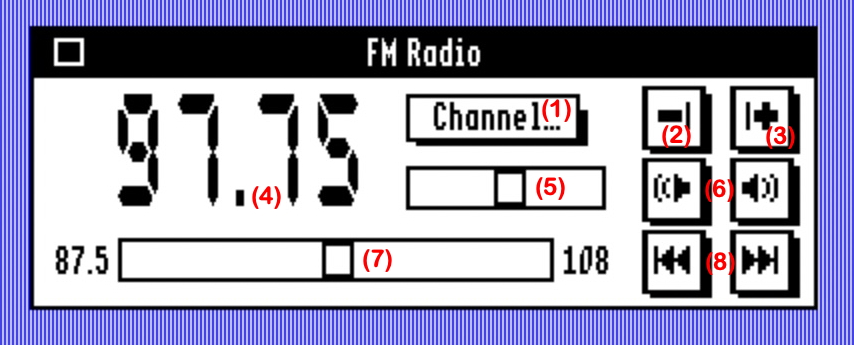
- Use the pop-up menu (1) to switch between pre-programmed stations.
- Use the "-" button (2) to remove the selected pre-programmed station.
- Use the "+" button (3) to add the current station to the list of pre-programmed stations.
You can store up to 16 preset stations in the Radio FM. When you click the "+" button, a new window opens and lets you enter the name of the channel. By default, its frequency is displayed. You can leave it as it is or enter a name up to 12 characters. Click "Save" to save it to the FM Radio or click "Cancel". - (4) indicates the current channel frequency.
- Move the volume slider (5) or click the icons (6) to adjust the volume.
- Move the frequency slider (7) from 87.5 to 108 MHz or click the icons (8) to adjust the frequency by an increment of 50 KhZ.
- You can press the "M" key to mute and unmute the FM Radio.
- When you close the New Desk Accessory, the FM Radio is not muted unless you press the Option key.
Troubleshooting
- Application won't open
Check to be sure that the FM Radio is connected directly to the Apple IIgs ADB port.
Try again, the detection of the ADB device may take time. - No sound from the IIgs
Plug external speakers. - Poor signal quality
Change the antenna's position. - Too few channels found
Change the antenna's position.
Minimum system requirements
The program requires at least 5KB of free memory.
It has been tested on Apple IIgs ROM 01 & ROM 3 versions.
It is compatible with System 6.x and above.
Download:

.2mg disk image (800k, v1)
Source code:
