Oct. 1st, 2012 - Apr, 19th, 2017 - Antoine Vignau and Olivier Zardini, founders of Brutal Deluxe Software, are proud to introduce their newest software to the Apple II community.
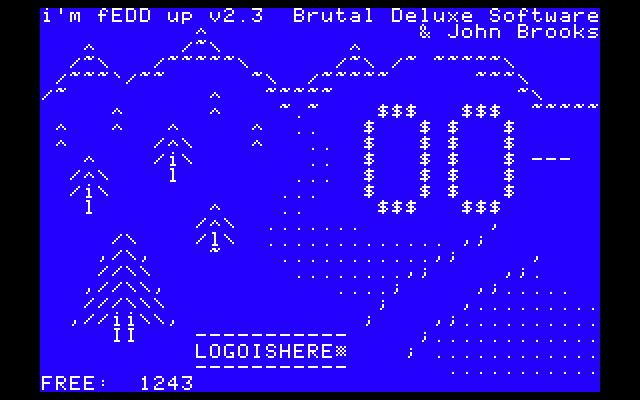
“i'm fEDD up” (now at version 2.3) is Brutal Deluxe's second answer to nowadays preservation of 3.5" and 5.25" diskettes on the Apple II.
We would like to thank Daniel Kruszyna (krue.net) for his artwork. Thanks to John Brooks for the 3.5" NIB code. Thanks to Brian Wiser and 4am for their requests for improvements. Thanks to a2heaven.com for their RamWorks 8MB memory card.
The main features of "i'm fEDD up" are:
- Essential Data Duplicator compatible
If Utilico Microware's EDD or compatible card is installed in your system, it will use the card's powerful features to read track data.
It supports quarter, half and full tracks! - Nibble and timing preservation
It saves raw nibbles and their associated time cycles in separate files, for both 5.25" and 3.5" disks. - ProDOS compatible
That may sound weird but that is important. SST is no longer needed ;-)
The requirement of two drives is no longer needed.
Visit Paul Hagstrom's EDD image project
The source code of the program is available.

John Brooks ReadMe
.N35/.T35 file format
Release notes
How to use?

	- 1. Launch the application
		Double-click the "imfEDDup.system" program

	- 2. To NIB image a disk, press S (5.25") or R (3.5")
		Enter an output filename of up to 11 characters
		The copy process is launched...

___________________________________________________________________________

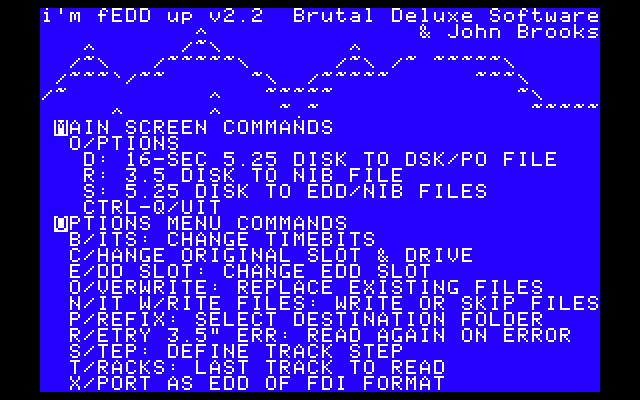
Main screen commands

	- D/isk to file image
		This option create a .DSK or .PO disk image from an unprotected 5.25" floppy disk.
		Enter an output filename of up to 11 characters.
		The application can guess the original file system.
		Launch the copy process...

	- S/ave file
		This option creates .NIB/.NIT and .EDD/.FDI files from a protected or
		unprotected 5.25" floppy disk.
		Enter an output filename of up to 11 characters.
		Launch the copy process...

	- R/ip 3.5" disk
		This option creates .NIB/.NIT from a protected or unprotected 3.5" disk.
		It requires an Apple //gs, a boot from ProDOS8 (no GS/OS), 3MB of RAM,
		 and a 3.5" disk in slot 5, drive 1.
		Enter an output filename of up to 11 characters.
		Launch the copy process...

	- O/ptions
		Display the options menu...

	- ?/Help
		Shall I really tell what that does?

	- CTRL-Q
		Shall I really tell what that does?

___________________________________________________________________________

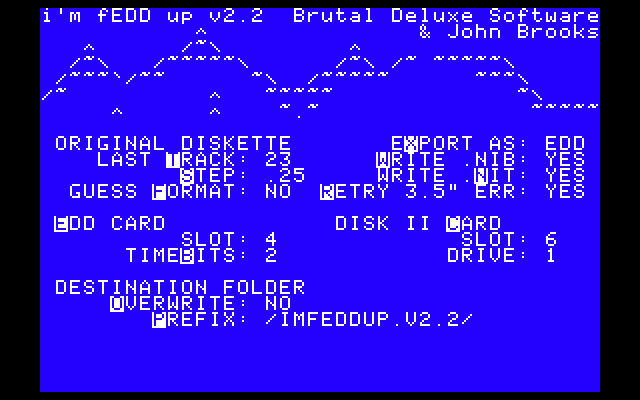
Option menu commands

	- B/its
		Change timebits of nibbles (1 or 2). Default is 2.

	- C/hange original slot & drive
		Select the slot & drive of your 5.25" disk controller card.
		Default is slot 6 and drive 1.

	- E/DD slot
		Select a slot where your EDD card is in (default is 0 and means no EDD card)

	- (Guess) F/ormat of diskette
		If set, the application tries to find the file system of the diskette and
		 sets the interleaving accordingly.
		The default interleaving is the DOS 3.3 one.

	- W/rite NIB files on disk
		By default, nibble files (.NIB) are written to disk.
		If turned off and if you have an active EDD card to rip your disks,
		 only the .EDD files are stored.

	- N/IT files on disk
		By default, timing bits files (.NIT) are written to disk.
		If turned off, only the .EDD or .NIB files are stored.

	- O/verwrite
		If set, existing files with the same name will be replaced

	- P/refix
		Display a destination folder menu, press:
		- RET to push a prefix,
		- TAB to change to next volume,
		- ESC to pop a prefix,
		- A to accept the current prefix,
		- CTRL-D to delete an unlocked binary file.

	- R/ead 3.5" again on error
		Sometimes, a 3.5" disk is not read entirely in memory.
		To prevent creating bad files, the option loops until the disk is reliably read.
		You can interrupt by pressing the ESC key.

	- S/tep
		Select the arm step:
		- 1.0 means every track (default)
		- .50 means every half-track
		- .25 means every quarter-track

	- T/racks
		Select the end track of the diskette:
			- $22 like a standard diskette (default)
			- $23 means one extra track
		Now, you can copy up to 40 tracks!

	- E/X/port as
		By default, files are exported as EDD files. Press X to export a bitstream
		file as a FDI one.

___________________________________________________________________________

File formats

	The application saves different files on your disk drive.
	Please make sure you launch it from a 32MiB partition to save several disk images.
	If the program encounters an I/O error while saving, that will stop the copy process.

	- .EDD format
		The most precise format. It contains data read from the 5.25" disk controller card
		before the Logic State Sequencer performs its magic.
		That means that data are read at a bit-level, it is a "simple" set of 1s and 0s.
		Each phase contains $4000 (16384) bytes.
		A standard $22 diskette (step 1 track) is 573,440 bytes long.

	- .FDI format
		The FDI format is similar to the EDD one in terms of bitstream.
		It has a header of $200 bytes and each phase is $4000 + 8 bytes long and is
		padded by $F8 zero bytes.

	- .NIB format
		It saves nibbles as if they were read by the Logic State Sequencer,
		therefore some protections may be lost (and I assure you they are)
		Each phase contains $1A00 (6656) bytes.
		A standard $22 diskette (step 1 track) is 232,960 bytes long.
		For a 3.5" disk image, the length of the file is 1,376,256 bytes long.

	- .NIT format
		It saves nibbles time cycle in a dedicated file.
		The default value of the timebit is $2.
		The different values are:
			- $00 for 32 cycles nibbles,
			- $01 for 36 cycles nibbles,
			- $02 for 40 cycles nibbles.
		Each phase contains $1A00 (6656) bytes.
		A standard $22 diskette (step 1 track) is 232,960 bytes long.

	- .N35 format
		It saves nibbles as they are read by the Integrated Woz Machine on an Apple //gs.
		For a 3.5" disk image, the length of the file is 1,376,256 bytes long.
		Please refer to John Brooks' documentation for more information.

	- .T35 format
		It saves nibbles time cycle in a dedicated file.
		For a 3.5" disk image, the length of the file is 1,376,256 bytes.
		Please refer to John Brooks' documentation for more information.

	- .DSK, .PO formats
		It saves standard 16-sec disks of DOS 3.3, ProDOS, Pascal and CP/M disks.
		The file extension is based on the operating system interleaving:
			- .DSK for DOS 3.3 and unrecognized disks,
			- .PO for ProDOS, Pascal and CP/M disks.

___________________________________________________________________________

File sizes for 5.25" images

	The combination of the Track and Step factors generates files of different file sizes.
	Let's summarize them here (Hello Emulator Coders!):

	FORMAT	TRACK	STEP	FILE SIZE (in decimal bytes)
	.EDD	$22	1.0	573,440
	.EDD	$22	.50	1,130,496
	.EDD	$22	.25	1,687,552
	.EDD	$23	1.0	589,824
	.EDD	$23	.50	1,163,264
	.EDD	$23	.25	1,736,704
	.EDD	$24	1.0	606,208
	.EDD	$24	.50	1,196,032
	.EDD	$24	.25	1,785,856
	.EDD	$25	1.0	622,592
	.EDD	$25	.50	1,228,800
	.EDD	$25	.25	1,835,008
	.EDD	$26	1.0	638,976
	.EDD	$26	.50	1,261,568
	.EDD	$26	.25	1,884,160
	.EDD	$27	1.0	655,360
	.EDD	$27	.50	1,294,336
	.EDD	$27	.25	1,933,312
	.NIB/T	$22	1.0	232,960
	.NIB/T	$22	.50	459,264
	.NIB/T	$22	.25	911,872
	.NIB/T	$23	1.0	239,616
	.NIB/T	$23	.50	472,576
	.NIB/T	$23	.25	938,496
	.NIB/T	$24	1.0	246,272
	.NIB/T	$24	.50	485,888
	.NIB/T	$24	.25	965,120
	.NIB/T	$25	1.0	252,928
	.NIB/T	$25	.50	499,200
	.NIB/T	$25	.25	991,744
	.NIB/T	$26	1.0	259,584
	.NIB/T	$26	.50	512,512
	.NIB/T	$26	.25	1,018,368
	.NIB/T	$27	1.0	266,240
	.NIB/T	$27	.50	525,824
	.NIB/T	$27	.25	1,044,992
	.DSK/PO	$22	1.0	143,360
	.DSK/PO	$23	1.0	147,456
	.DSK/PO	$24	1.0	151,552
	.DSK/PO	$25	1.0	155,648
	.DSK/PO	$26	1.0	159,744
	.DSK/PO	$27	1.0	163,840

___________________________________________________________________________

Minimum System Requirements

	It is a 6502 compatible application and it requires a 80-column card.
	It has been tested on Apple IIe Platinum, IIgs ROM 01 & ROM 3 versions.

	There's 4KiB left for ADTPro compatibility ;-)

___________________________________________________________________________

Copyright Notice

	Parts of the source code (UP.EDD.S) are (c) 1986, Utilico Microware.
	Parts of the source code (UP.DISK35.S) are (c) John Brooks.
	Artwork by Daniel Kruszyna (http://krue.net/)
Download :

i'm fEDD up v2.3 - 800 KB disk image
i'm fEDD up v2.3 - 140 KB disk image
i'm fEDD up v2.3 - 32M+800K+140K disk images
i'm fEDD up v2.2 - 800 KB disk image
i'm fEDD up v2.2 - 140 KB disk image
i'm fEDD up v2.1 - 32M+800K+140K disk images
i'm fEDD up v2.1 - 800 KB disk image
i'm fEDD up v2.1 - 140 KB disk image
i'm fEDD up v2 - 32M+800K+140K disk images
i'm fEDD up v2 - 800 KB disk image
i'm fEDD up v2 - 140 KB disk image
i'm fEDD up v1.1 - 800 KB disk image
i'm fEDD up v1.1 - 140 KB disk image
i'm fEDD up v1 - 800 KB disk image
i'm fEDD up v1 - 140 KB disk image
EDD Plus Manual - 1.2 MB